Our docs are written using Obsidian. While we do not rely on any plugins, we do utilize markdownlint to check over our formatting before merging. Please ensure the below style rules are followed while working on the docs.
Obsidian Settings
The following Obsidian settings are recommended to ensure formatting and other rules are applied correctly:
| Path | Value | Enforced |
|---|---|---|
| Editor > Display > Show line numbers | true | |
| Editor > Behavior > Indent using tabs | false | Yes |
| Files and Links > Default location for new attachments | In subfolder under current folder | Yes |
| Files and Links > Subfolder name | attachments | Yes |
Linting
The easiest way to lint your files is by using the markdownlint plugin for VS Code. Then, from VS Code, run Ctrl+Shift+P → Lint all Markdown files in the workspace with markdownlint. This will generate a report of what needs to be changed.
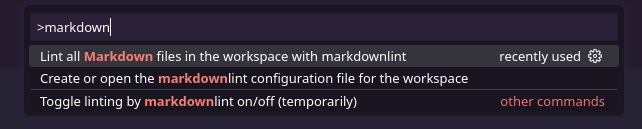
Below is a non-exhaustive list of rules to follow when writing Markdown.
Headings
- There should never be any
#-level headings in any document. - The largest heading must be
##. - There must not be any headings smaller than
##without a parent heading. - Each subheading must increment by exactly one step (
##→###). - There must be one empty line before and after each heading.
- There must always be plain text at the top of the file before introducing a
##heading.
Lists
- All list items containing independent clauses must end with a period.
- All lists must have a blank line before and after them.
- Nested lists are okay.
Ordered Lists
- Ordered lists must be in
1. 1. 1.format.
Unordered Lists
- Unordered list items must use dashes (
-) in front of line items.
Code blocks
- All multi-line code blocks must have one blank line before and after them.
Files
- Each file must have one blank line at the end.
Links and Aliases
- When using
[[wikilink]]syntax to include links in the middle of a sentence, alias them to match the surrounding wording. For example,[[Team]]is often aliased asteamto maintain sentence structure. Links can be aliased like so:[[Team|team]].- This applies to both capitalization and wording of the entire link. Consider the following example:
"Read our [[Development/Docs/Setup|setup guide]] for more information."
- This applies to both capitalization and wording of the entire link. Consider the following example:
Tags
All tags must be listed as file properties as follows:
---
tags:
  - math
---
Images
All images must be under an attachments/ subfolder under the directory of the file which uses the image.